Create return stages

The Admin or a user with the Administrator role can create return stages to assign to tax returns in the return list. This list enables your preparers to assign a stage to a return, such as Missing W-2, Missing Spouse Signature, Paid in Full, or whatever meets your business needs.

To create return stages, use the following steps:

  1. Log in as the Admin or a user with the Administrator role.
  2. Click your name on the top right of the screen and select Settings.
  3. Click General Settings.
  4. Click Return Stages in the Administrator Settings.
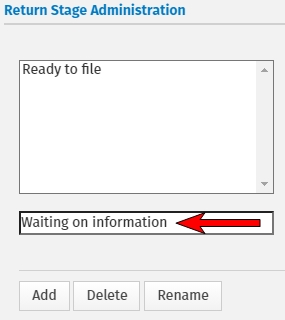
  5. Enter a return stage in the lower field (one return stage at a time).

  1. Click Add.

You can delete or rename a particular return stage by selecting the desire stage and click Delete or Rename.

  1. To complete the Print Sets, click on the Print Sets in Administrator Settings.
  2. Click Save and Close to close the General Settings.

See Also:

Administrator settings

Set the Return Stage